



Official-Affiliate
Official-Affiliate
Chi Siamo
About Us

Sponsor Principali
Main Sponsors


r/Black_Angel_Team

TikTok
TikTok
- Assetto Corsa EVO — Update 0.9 Disponibile: Nuove Vetture, Classifiche Online e Aggiornamento del Modello Fisico – Assetto Corsa EVO — Update 0.9 Disponibile: Nuove Vetture, Classifiche Online e Aggiornamento del Modello Fisico L'Update 0.9 di Assetto Corsa EVO è o...
- Automobilista 2 V1.6.9.91 è Ora Disponibile — Ulteriori Correzioni e Miglioramenti – Automobilista 2 V1.6.9.91 è Ora Disponibile — Ulteriori Correzioni e Miglioramenti Reiza Studios ha rilasciato il piccolo aggiornamento V1.6.9.91 per Auto...
- Project Motor Racing — PMR Test Centre: Un Circuito di Prova Gratuito per Tutta la Community – Project Motor Racing — PMR Test Centre: Un Circuito di Prova Gratuito per Tutta la Community Il team di Project Motor Racing ha rilasciato gratuitamente tramite ...
Notizie
News
22
Gennaio
2025

SimHub: Il Cuore Pulsante del Tuo Simulatore di Guida Personalizzato

Il mondo dei simulatori di guida è in continua espansione, offrendo esperienze sempre più realistiche e coinvolgenti. Ma per raggiungere l'apice dell'immersione, spesso non basta affidarsi solo al software di simulazione. È qui che entra in gioco SimHub, un potente e versatile software che si è guadagnato un posto d'onore nel cuore di molti sim-driver. SimHub non è semplicemente un'applicazione; è un ecosistema completo che permette di personalizzare e potenziare ogni aspetto della tua esperienza di guida virtuale, trasformando il tuo setup in un vero e proprio cockpit di Formula 1 (o di qualsiasi altra auto tu preferisca).
Cos'è SimHub?
SimHub è un software gratuito e open-source, creato da Wotever, che si interfaccia con la maggior parte dei simulatori di guida più popolari. La sua forza risiede nella sua capacità di raccogliere dati telemetrici in tempo reale dal simulatore e di utilizzarli in svariati modi:
-
Dashboard Personalizzate: Forse la sua funzione più popolare, SimHub permette di creare dashboard completamente personalizzate da visualizzare su schermi esterni, smartphone, tablet o persino display dedicati. Questi dashboard possono mostrare qualsiasi dato telemetrico desiderato, come velocità, giri motore, temperature, pressione dei freni, consumo di carburante, mappa del circuito, tempi sul giro, e molto altro.
-
Effetti Haptic: SimHub permette di integrare effetti haptic (vibrazioni) con vari dispositivi, come i transducer bass shaker (buttkicker) o i sistemi di vibrazione per pedali. Questi effetti aumentano significativamente l'immersione, permettendoti di “sentire” l'auto, le asperità della strada, i cambi di marcia, e le frenate.
-
Led RGB: Se il tuo setup include dispositivi come volanti o display con LED RGB, SimHub ti permette di controllarli e programmarli in modo dinamico, facendoli reagire ai dati del simulatore. Puoi, ad esempio, far accendere i LED al raggiungimento di un certo regime di giri o al momento del cambio marcia.
-
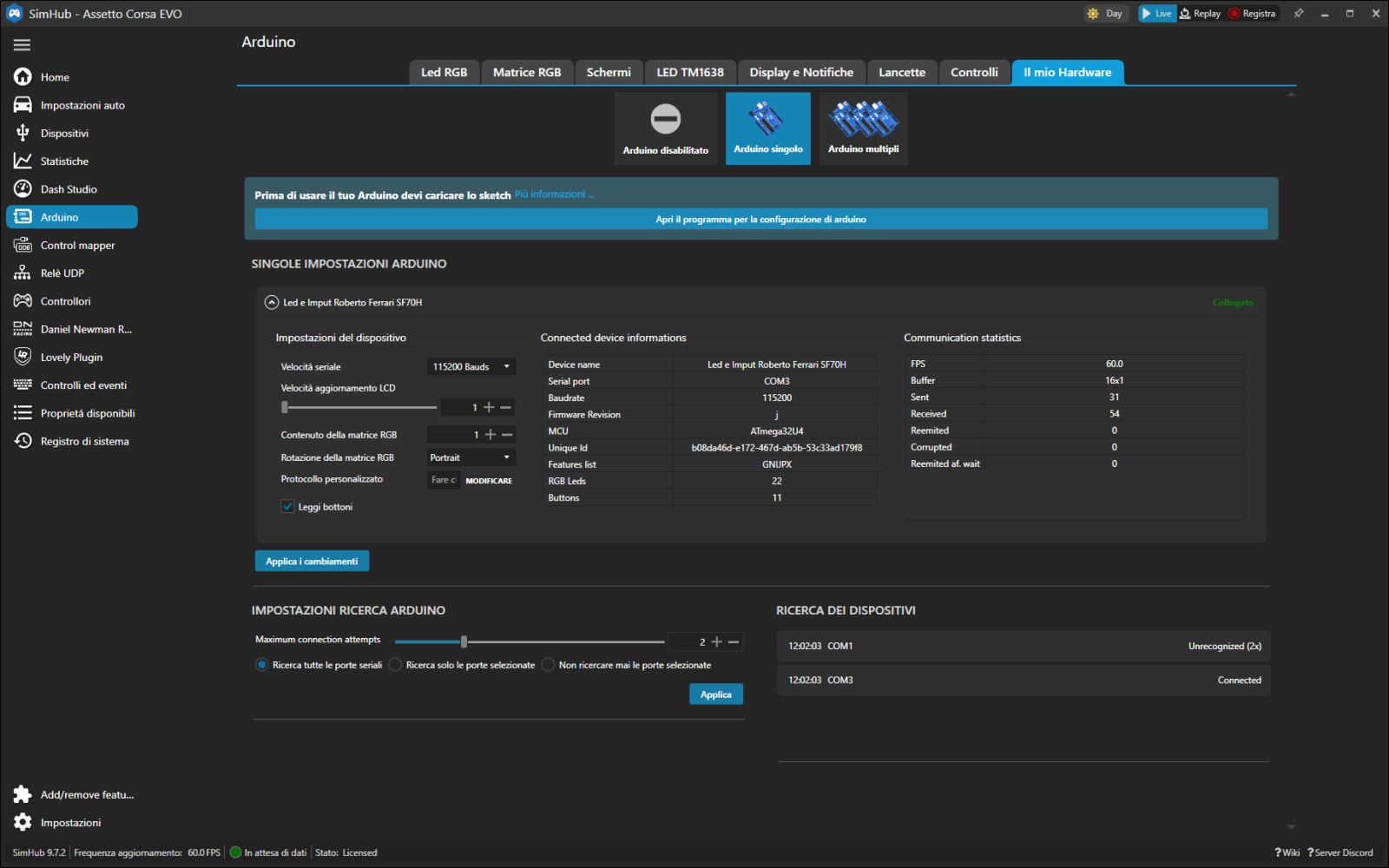
Integrazione con Hardware: SimHub supporta un'ampia gamma di hardware, inclusi display LCD, encoder rotativi, pulsantiere, sistemi di telemetria dedicati e molto altro. Questo ti consente di creare un cockpit altamente personalizzato e funzionale.
-
Audio Telemetria: SimHub può utilizzare i dati di telemetria per generare segnali audio che contribuiscono all'immersione, come ad esempio avvisi acustici per il blocco delle ruote o per il raggiungimento del limitatore.
Perché Utilizzare SimHub?
L'utilità di SimHub va ben oltre la semplice visualizzazione di dati. Ecco alcuni dei principali motivi per cui un appassionato di simulatori di guida dovrebbe considerare di integrarlo nel proprio setup:
-
Personalizzazione Totale: SimHub ti permette di creare un ambiente di simulazione unico e su misura per le tue esigenze. Non sei limitato alle dashboard predefinite offerte dal simulatore. Puoi decidere quali dati visualizzare, come visualizzarli e dove visualizzarli.
-
Maggiore Immersione: Gli effetti haptic e l'audio telemetria aggiungono una dimensione sensoriale che eleva l'esperienza di guida. Invece di “vedere” la macchina, inizi a “sentirla”, aumentando il realismo e il coinvolgimento.
-
Migliore Prestazione: Monitorare i dati in tempo reale, come le temperature degli pneumatici o l'ABS, può aiutarti a prendere decisioni più accurate e a migliorare le tue performance in pista.
-
Flessibilità: SimHub è compatibile con un'ampia gamma di simulatori, hardware e dispositivi, rendendolo un investimento versatile e a prova di futuro.
-
Comunità Attiva: La vasta comunità di utenti di SimHub condivide regolarmente dashboard, profili e consigli, rendendo l'apprendimento e la personalizzazione più semplici e accessibili.
-
Gratuito e Open-Source: SimHub è un progetto gratuito e open-source, il che significa che puoi utilizzarlo senza costi e contribuire al suo sviluppo.
Come Iniziare con SimHub
Installare e configurare SimHub può sembrare complesso all'inizio, ma seguendo questi passaggi, sarai in grado di sfruttare appieno il suo potenziale:
-
Download e Installazione: Scarica l'ultima versione di SimHub dal sito ufficiale del creatore (Wotever). Il processo di installazione è semplice e guidato.
-
Configurazione del Simulatore: Avvia SimHub e seleziona il simulatore di guida che intendi utilizzare. SimHub si connetterà automaticamente al simulatore e inizierà a ricevere i dati telemetrici.
-
Creazione di una Dashboard:
- Apri l'editor di dashboard di SimHub.
- Trascina e rilascia i componenti desiderati (testi, grafici, led, immagini, ecc.) sulla dashboard.
- Configura ogni componente in base alle tue esigenze, selezionando i dati da visualizzare e personalizzando l'aspetto.
- Salva la tua dashboard.
-
Output della Dashboard:
- Seleziona il dispositivo su cui visualizzare la dashboard (monitor, smartphone, tablet, display).
- Regola le impostazioni di output per adattare la dashboard al tuo dispositivo.
-
Configurazione degli Effetti Haptic:
- Seleziona la scheda dedicata agli effetti haptic.
- Aggiungi nuovi effetti e associali ai dati di telemetria.
- Regola l'intensità e la frequenza degli effetti per trovare la configurazione ideale.
-
Configurazione dei LED RGB:
- Seleziona la scheda dedicata ai LED RGB.
- Associa i LED ai dati di telemetria e imposta i loro comportamenti.
-
Test e Fine Tuning:
- Avvia il simulatore e testa la tua configurazione di SimHub.
- Apporta modifiche e ottimizzazioni fino a raggiungere il risultato desiderato.
Esempi Pratici di Utilizzo di SimHub
Le possibilità di personalizzazione offerte da SimHub sono pressoché infinite. Ecco alcuni esempi pratici di come puoi utilizzarlo per massimizzare la tua esperienza di guida:
-
Dashboard per Auto da Corsa: Crea una dashboard con indicatore di velocità, giri motore, marcia inserita, temperature degli pneumatici, indicatori di ABS e TC, tempi sul giro, e mappa del circuito.
-
Dashboard per Auto Stradali: Realizza una dashboard con indicatore di velocità, consumo di carburante, temperatura dell'acqua, ora, mappa di navigazione e altre informazioni utili per una guida realistica e coinvolgente.
-
Effetti Haptic Immersivi: Utilizza i transducer bass shaker per “sentire” il motore, le vibrazioni della strada, i cambi di marcia e le frenate, aumentando drasticamente la sensazione di guida.
-
LED RGB Personalizzati: Configura i LED del volante per lampeggiare quando raggiungi il limitatore, per indicare il cambio marcia o per avvisarti di eventuali allarmi.
-
Display Esterni: Utilizza display LCD dedicati per visualizzare dati telemetrici aggiuntivi, come tempi sul giro, posizione in gara, e condizioni meteorologiche.
Il Futuro di SimHub
SimHub è un progetto in continua evoluzione, con nuove funzionalità e miglioramenti aggiunti regolarmente. La sua natura open-source e la sua vasta comunità garantiscono un futuro promettente, con sempre più simulatori e hardware supportati. Con SimHub, la tua esperienza di simulazione di guida non ha limiti.
Conclusioni
SimHub non è solo un software; è un potente strumento che trasforma il tuo setup di simulazione in un'esperienza di guida personalizzata, immersiva e coinvolgente. Che tu sia un principiante o un sim-driver esperto, SimHub offre un valore inestimabile, permettendoti di esplorare le tue passioni e di ottimizzare le tue performance in pista. Se sei alla ricerca del massimo realismo e della personalizzazione totale, SimHub è una risorsa indispensabile che non puoi permetterti di ignorare. La sua capacità di connettersi a un'ampia gamma di simulatori e hardware, la sua natura open-source e la sua comunità attiva lo rendono un investimento sicuro e destinato a durare nel tempo.



simhubdash.com
Ascolta l'Articolo
Devi essere registrato per scrivere commenti!
• Registrati
• Per iscriversi


